Problem
We have various README.md files scattered across disparate Github accounts. How can we consolidate these documents and keep them updated at the same time?
Agent Docs Repository
This is the mechanism by which Fastly WAF docs from various signalsciences github repos are aggregated and published to the intranet. Any changes to .md files in the following sigsci repos
- signalsciences/sigsci-module-nodejs
- signalsciences/sigsci-module-envoy
- signalsciences/sigsci-module-haproxy
- signalsciences/sigsci-module-iis
- signalsciences/sigsci-module-java
- signalsciences/sigsci-agent
- signalsciences/sigsci-module-nginx
- signalsciences/sigsci-module-apache
- signalsciences/sigsci-module-envoy
- signalsciences/sigsci-module-python
- signalsciences/module-testing
- signalsciences/sigsci-module-haproxy
- signalsciences/sigsci-module-iis
- signalsciences/sigsci-agent-core
- signalsciences/sigsci-module-dotnet
- signalsciences/agent-module-performance
will automatically get downloaded to this repo and published via elevation to https://waf-agents-docs.prd.k8s.secretcdn.net pending a PR approval and merge prompted via slack channel #team-waf-agent-private.
Diagram
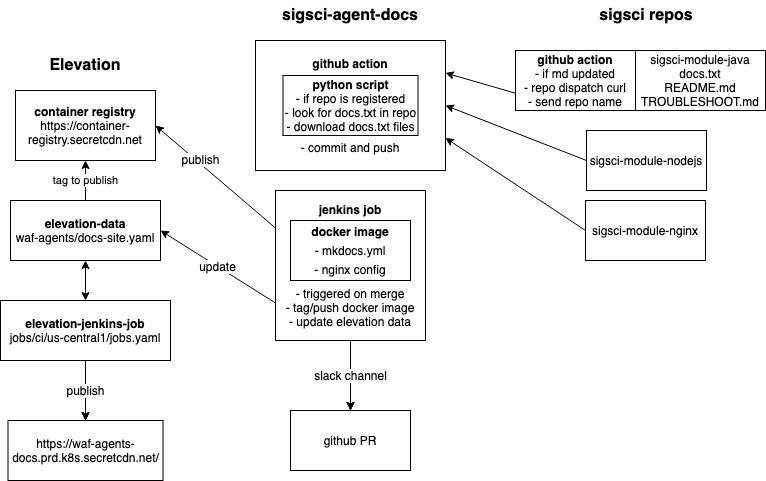
Workflow
Github Actions
This repo receives updates via a repo dispatch curl command from other signalscience repos, included in the message payload is the name of the repo being updated. The repo dispatch message is sent whenever an .md file is pushed and merged for any of the repos specified above. This will then kick off the python script which downloads the appropriate files into the repo. Once this completes, the github action will automatically commit and push the changes.
Python script
The receiver then calls a python script, main.py which takes two arguments, the name of the repo being updated as well as a github repo secret. The secret argument is there to prevent us from storing github secrets directly in in our repos. The python script then searches for the named repo in a config/repos.txt for a match and if found will look for a docs.txt file in the top level directory of the repo. The docs.txt file contains the list of md files that will be published for that repo.
Mkdocs
Mkdocs is used to control the navigation of the locally stored .md files that have been downloaded to this repo. The appearance and navigation for the site is managed by the mkdocs.yml file.
Docker image
This is what we use to publish to the elevation container registry. The Dockerfile setups a simple nginx server here as well as copying the mkdocs generated site into the appropriate web directory for nginx.
Elevation
What is elevation?
Platform based on Kubernetes which helps with deploying containerized services. Among other things it provides
- DNS records
- Okta SSO
- Load balancing
- Container registry and Helm registry
Helm 101
Helm can be considered a templating package manager for Kubernetes and a helm chart is a collection of kubernetes object definitions that can be deployed as a single, versioned release. This release is a called a helm release and can solve some of the problems and complexity that comes with managing individual object deployment within Kubernetes across multiple environments.
Elevation is the platform by which we're able to publish the consolidated mkdocs site to the intranet. Elevation requires a docker container to be created and published to the container registry and via Jenkins. The Dockerfile builds a basic nginx web server copies the generated mkdocs site there. For the Jenkins integration to work we need to also update the following:
This is required to register the sigsci-agent-docs repo in Elevation.
This is required so Elevation knows which image and tag in the container registry to use to publish onto the web. It also where we configure the DNS mapping so we know what URL to point to.
Jenkinsfile will upload the docker container to the elevation container registry and then point elevation to the most recent tag, it also creates the slack notification with a link to the PR which needs to be approved and closed in order to update the website.
Presentation
Here is a presentation with some worked examples: